For Reels, TikToks and YouTube
Saved videos, turned into something you use.
Share a video to Nook. It breaks it down — the recipe, the places, the list, the tips — and files it into collections you name.
How it works
Save. Sort. Do. Check.
Four steps from “I’ll watch it later” to dinner on the table.
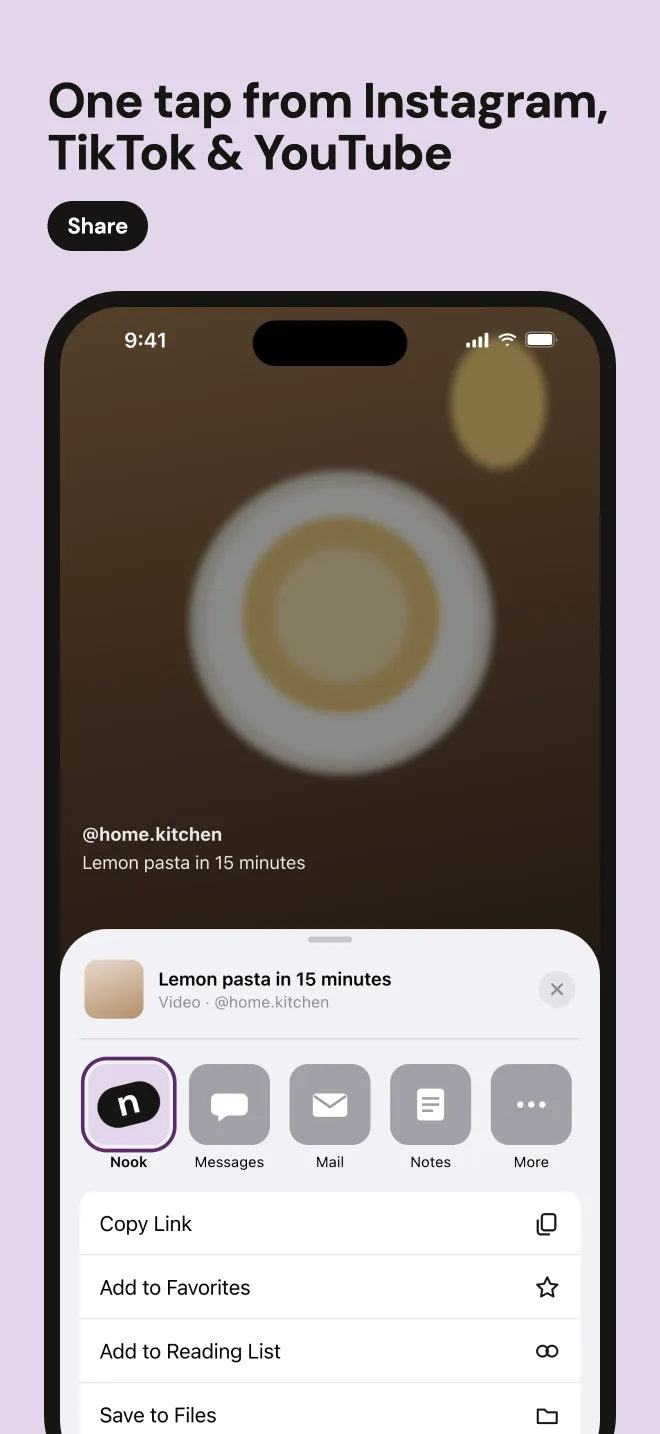
One tap from the share sheet.
Watching something worth keeping? Tap Share in Instagram, TikTok or YouTube and pick Nook. Or copy the link — Nook notices it when you open the app.
- Reels, TikToks, YouTube videos and Shorts
- Nook keeps the link, not the video file
- The breakdown is ready in seconds
Collections you name yourself.
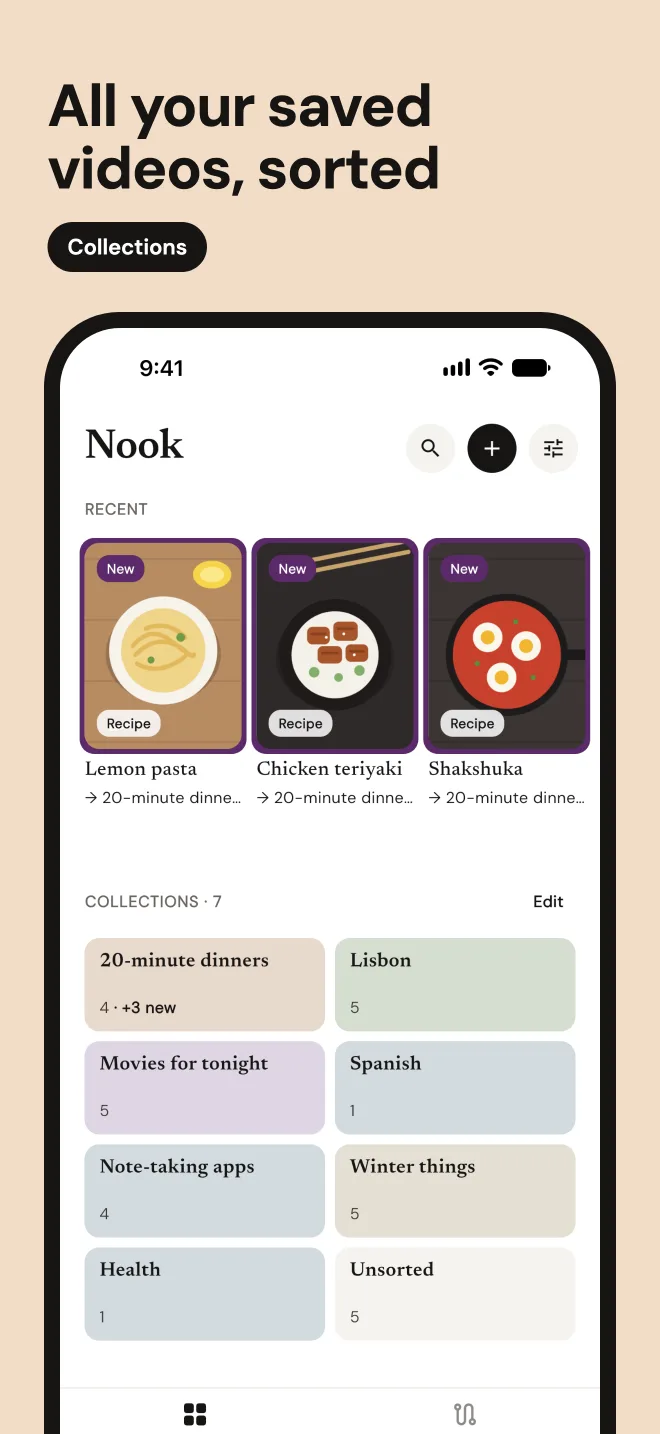
Make collections the way you think — “20-minute dinners”, “Lisbon”, “Movies for tonight”. Nook files each new video where it belongs and suggests a new collection when nothing fits.
- Auto-sorting into your own collections
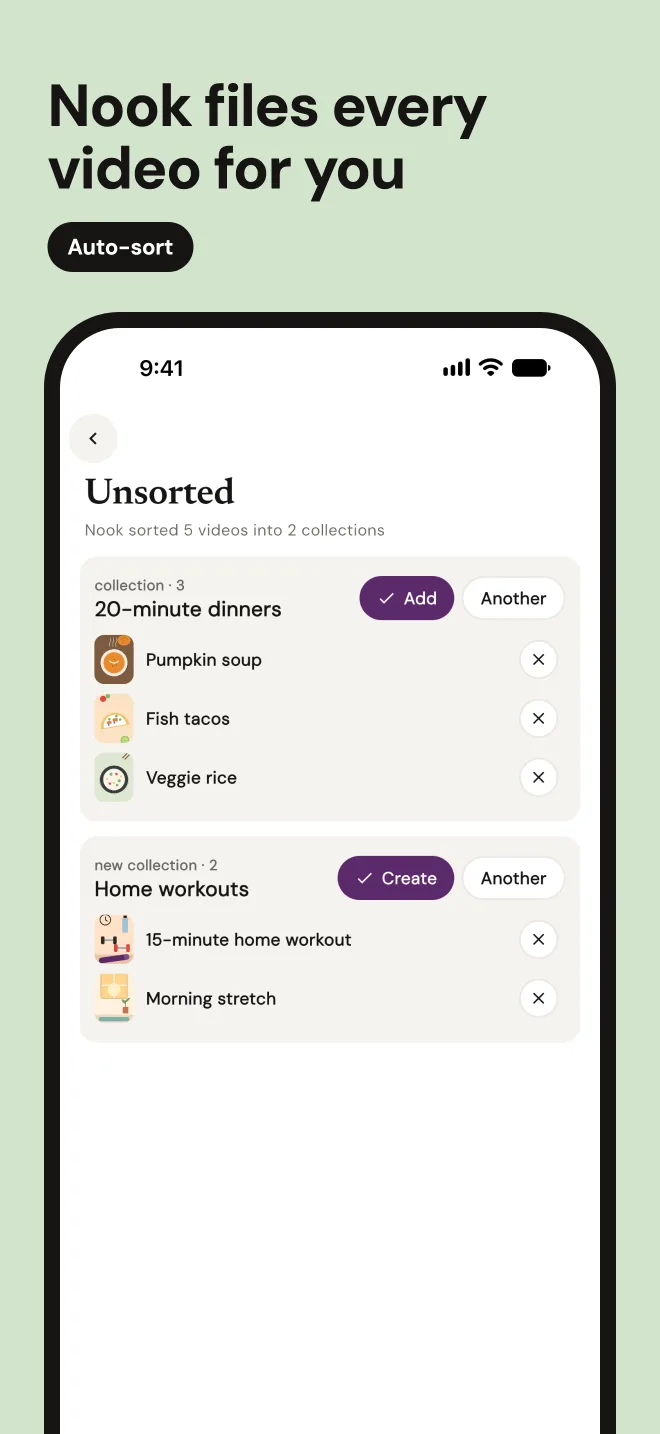
- Unsorted groups similar videos so you can file them at once
- Move anything with one tap; Nook learns from it
Every collection gets an action.
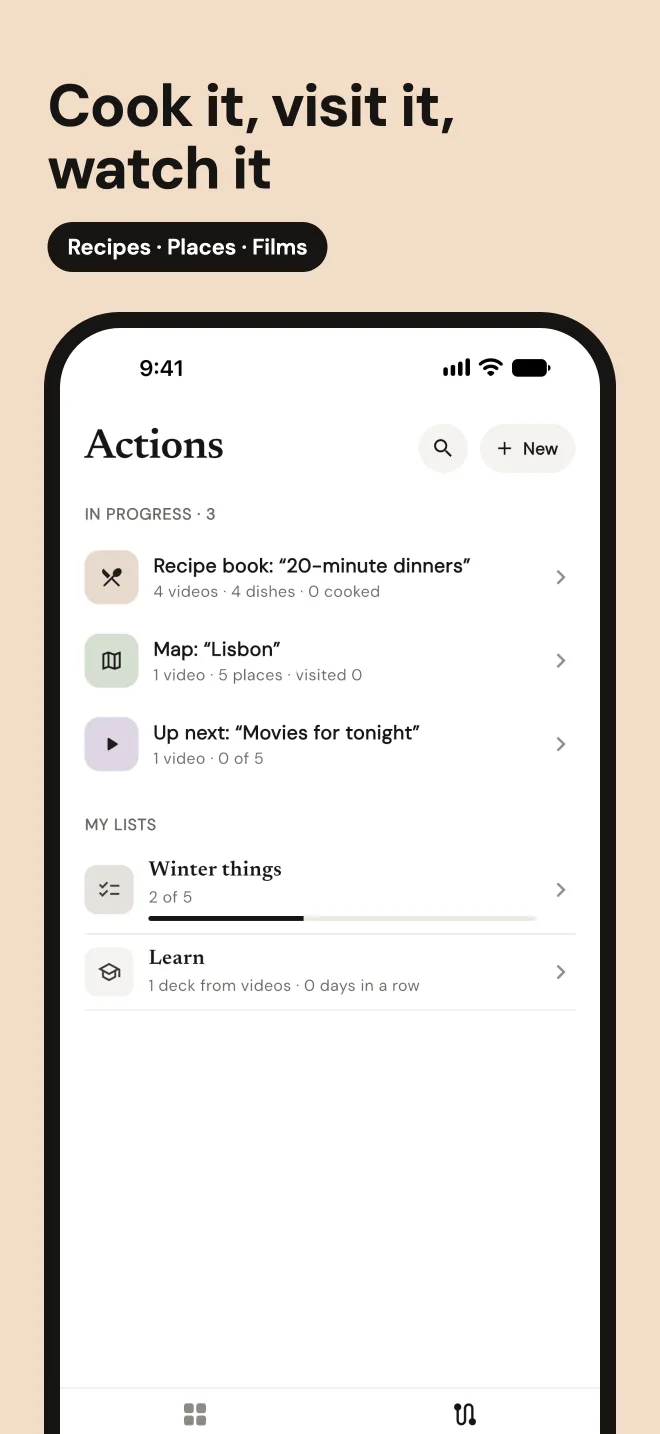
A saved video should be something you use. Nook turns each kind of collection into the tool it needs.
- Recipes → a cookbook, cooking mode with step timers, a shopping list
- Places → a map
- Films → watch one by one
- Lessons → a deck to learn
- Many videos → a summary, a comparison, your own list
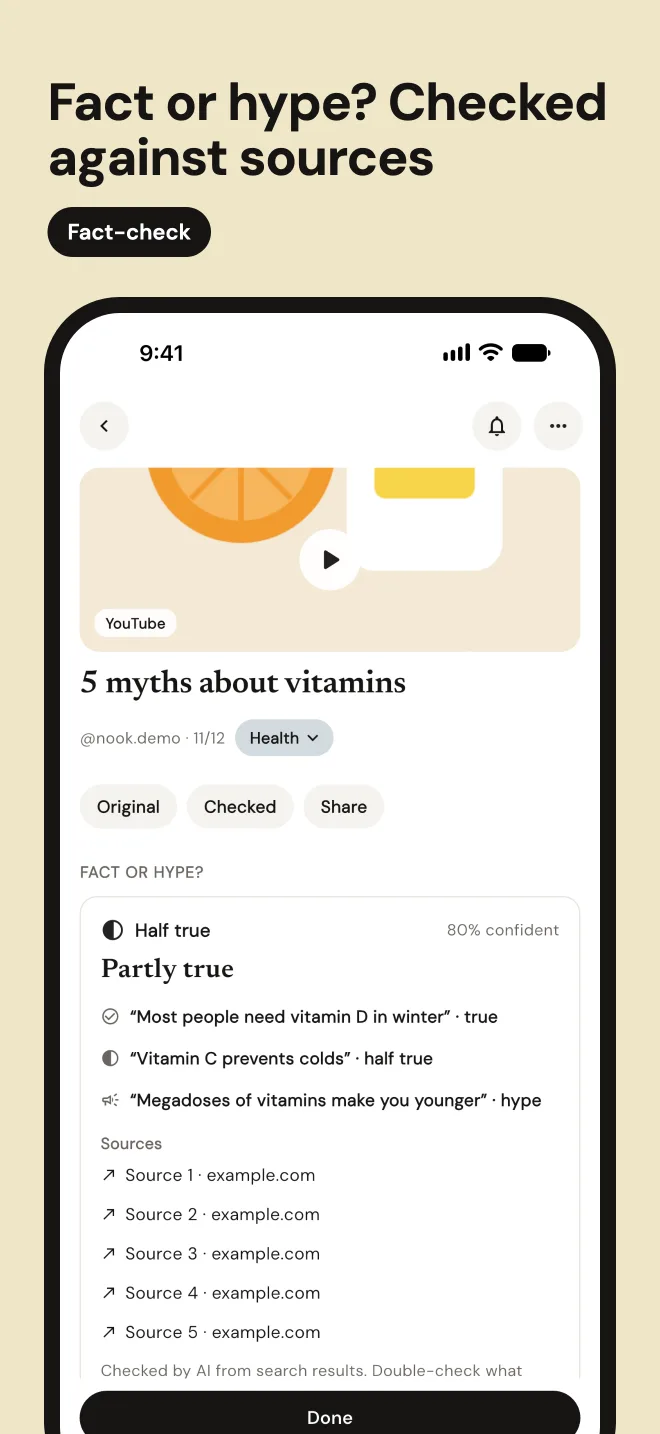
Fact or hype?
Health and money videos are full of confident claims. Nook checks each one against sources and tells you what holds up, what’s hype and what’s unclear.
- Every claim gets a verdict
- Links to the sources it used
- Your call in the end
Before / after
From “saved” to sorted.
Most saved videos are never opened again. In Nook each one becomes part of something.
Before
One “Saved” folder. 300 videos.
After
Collections that do something.
What Nook does
Every scene, its own tool.
Whatever the video is about, Nook gives it a shape you can use.
Save from any app
Tap Share in Instagram, TikTok or YouTube, then Nook. Or copy the link — Nook picks it up from the clipboard.
The video, broken down
Nook pulls out what the video is about: a recipe, a list of places, films, apps, tips or a lesson.
Breakdown
Lisbon in one day
Sorted into your collections
Name collections the way you think: “20-minute dinners”, “Lisbon”. Each new video lands in the right one.
Collections
Unsorted, in groups
When Nook isn’t sure, the video waits in Unsorted, grouped with similar ones so you can file ten at once.
Unsorted · new collection
A cookbook from your recipes
Every cooking video becomes a recipe with ingredients and steps. Mark what you’ve cooked.
Recipe · 15 min
Lemon pasta
Cooking mode with timers
Big text, one step at a time, a timer on every step that has one. No pausing a reel ten times.
Step 3 of 6
Boil the pasta until al dente, 9 minutes
Next stepShopping list
Send a recipe’s ingredients, or a whole collection’s, to one shopping list. Tick things off in the shop.
Shopping list · 3 left
Places on a map
Cafés, viewpoints and shops from travel videos, pinned on a map. Sort by what’s near you and mark where you’ve been.
Watch one by one
Film and series picks line up in a queue. Mark one as watched, and the next is up.
Learn from lessons
Language and how-to videos become a deck of cards. A few minutes a day, repeated at the right time.
Spanish · 3 of 8 learned
¿Me pones un café?
Can I get a coffee?
Summary of many videos
Ten videos on one topic, boiled down to the points they share.
The gist of 10 videos
Health
Compare side by side
Up to six apps or products from different videos in one table, feature by feature.
Compare 4 apps
Your own lists
Pick items from several videos and make a list of your own, like “Winter things”.
My list · from 3 videos
Winter things
Fact or hype?
For health and money videos, Nook checks each claim against sources and shows what holds up — with links.
Fact or hype? · 80% confident
Partly true
Share a collection
Send a collection as a link. Anyone with it can open the page. Remove the link any time.
Shared collection
Lisbon
Backup with a recovery code
Your library is backed up under a random code. New phone? Enter the code and everything is back.
Recovery code
Five languages
English, Spanish, French, German and Russian. Units, dates and prices follow your region.
Language
No account, no ads
No sign-up, no email, no password. Nothing to read but your own videos.
Sign up
Not needed.
Privacy
Private by design
Nook is a place for your own videos, not a social network.
No account
No sign-up, no email, no password. Nook doesn’t know who you are.
Your library lives on your phone
Videos, collections, lists and notes are stored in the app on your device.
No video files kept
Nook keeps the link and a text breakdown. The video is fetched once for analysis and then deleted.
Backup by recovery code
An optional copy on our server, sent encrypted, under a random code that isn’t linked to your name, email or device. Turn it off and delete it in Settings.
AI only with your consent
Breakdowns use Google Gemini. Nook asks first; without consent, videos are saved without a breakdown.
No ads, no selling
We don’t show ads, sell data or track you across apps and websites.
Pricing
Start free. Go Pro for more.
Breakdowns and AI actions cost us money to run, so the free plan has limits.
Free
- 50 saved videos
- 10 video breakdowns
- 5 AI actions — summary, compare, decks
- 3 fact-checks
- Backup and shared links
Nook ProSave 40%
$49.99 a year
or $6.99 a month
- Everything in Free
- Unlimited saving
- 50 breakdowns a month
- 30 AI actions a month
- 10 fact-checks a month
- Cancel anytime in the App Store
FAQ
Questions
Does Nook download videos?
No. Nook keeps the link to the original video and a text breakdown: the recipe, the places, the list, the tips. To make the breakdown, our server fetches the public video once, has it analysed, and deletes the file.
Do I need an account?
No. There is no sign-up, email or password. Your library is tied to your phone, and the optional backup to a random recovery code.
Where is my data stored?
On your phone. If Auto backup is on, a copy is kept on our server under a random recovery code, sent encrypted in transit. On a new phone, enter the code to get everything back.
Which apps can I share from?
Instagram Reels, TikTok and YouTube, including Shorts. Use Share → Nook, or copy a link and open Nook. Nook works with public videos.
What about long videos?
Nook analyses the first 3 minutes of a long video. That covers almost every recipe, travel or tips video.
Can the AI be wrong?
Yes, sometimes. Every card links back to the video so you can check, and you can edit or move anything. “Fact or hype?” shows its sources so you can read them yourself.
Which languages does Nook speak?
English, Spanish, French, German and Russian. Breakdowns come in the language of the app whatever the video’s language, and units, dates and prices follow your region.
How do I cancel Pro or delete my data?
Cancel in iPhone Settings → your name → Subscriptions → Nook. Your library is deleted with the app; turn off Auto backup and confirm to delete the server copy too.